user@l1ghtn1ng:~$ cat blog/workflow-claude-code-bug-bounty.md
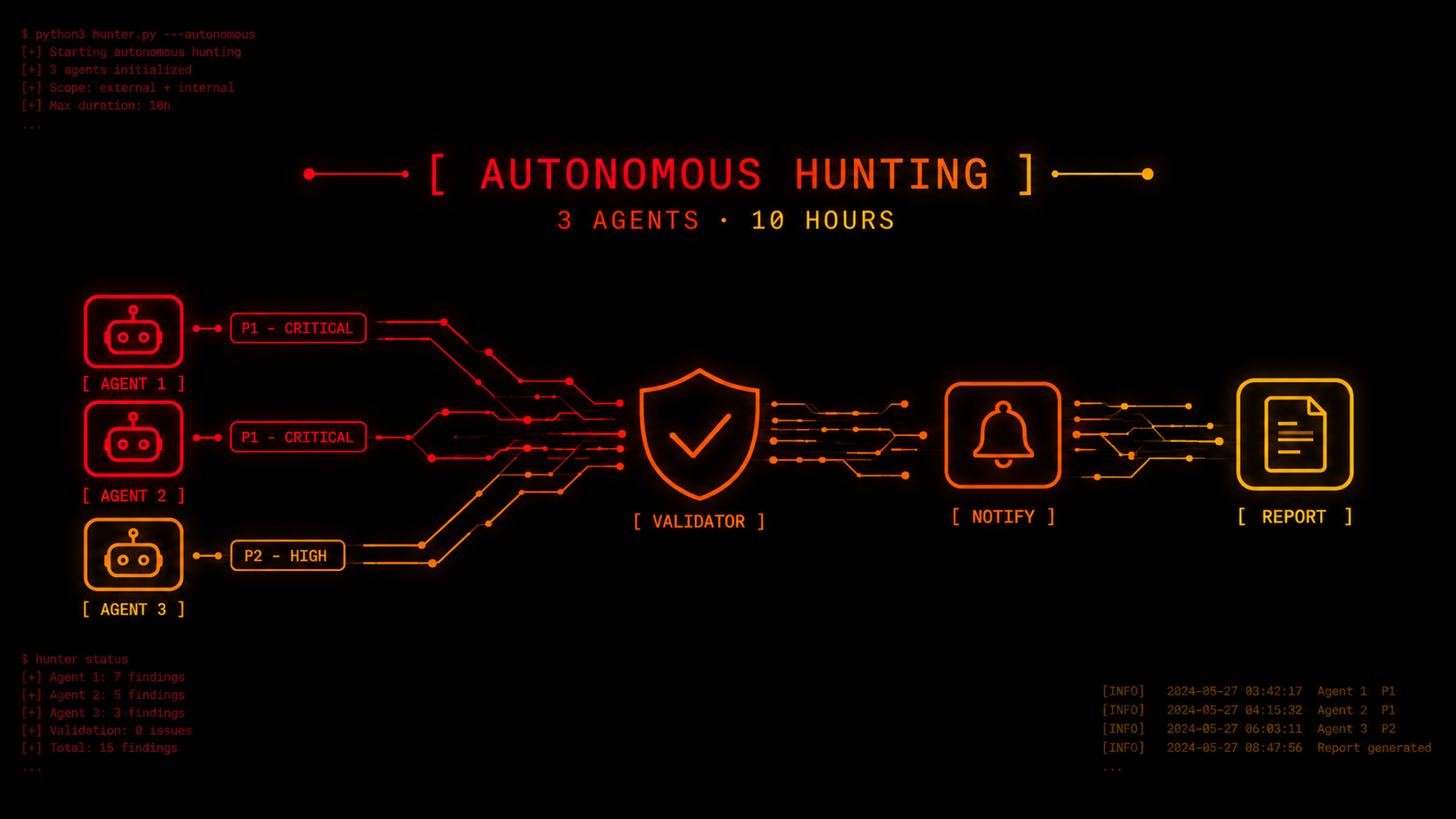
My Claude Code agents found two critical vulnerabilities and one high in less than 10 hours
- #BugBounty
- #AI
- #hacking
- #write-up
How my autonomous bug bounty workflow with Claude Code agents is built (skills, knowledge base, validation, memory across sessions, MCPs) and how in less than 10 hours they found two P1 vulnerabilities and one P2.
I'd been doing bug bounty manually, with help from LLMs, but agents were getting really popular and I wanted to see how far I could go with them. For several weeks I was researching, running tests and improving my workflow until I got to the results I share in this article. Obviously there's still a lot to improve, but I wanted to share what's working for me.
I decided to try it on YesWeHack, a platform I had never hunted on before. After setting up the environment, I left three Claude Code agents working autonomously overnight on a bug bounty program, each one researching a different surface.
When I woke up, they had found a critical vulnerability and a high one. We validated them with my collab Francisco Alcaide (r0mato), reported them, and the next day I launched the agents again. Within a couple of hours they found another critical vulnerability that allowed remote code execution (RCE).
One of the criticals was accepted (CVSS 9.1), while the other two turned out to be internal duplicates (the company already knew about them from its own audits). All in less than 10 hours of accumulated work across the agents. There was only one false positive.
This article isn't about the vulnerabilities themselves (although I go over them very briefly at the end), but about how they were found. Once I defined the scope, created the necessary accounts and left everything running, the agents took care of analyzing, forming hypotheses, taking notes, running tests and chaining vulnerabilities with no manual intervention during the research.
And what made all of this possible wasn't the model itself, but everything around it: the harness.
Note: I have Defense Access enabled through Anthropic's Cyber Verification Program, so I have fewer limitations when running security tests.
A few concepts before we start
- Agent: A language model that doesn't just reply with text, but can use tools (run commands, read and write files, make HTTP requests) in a loop: it thinks, acts, looks at the result and decides the next step. Claude Code is exactly that, an agent that runs in the terminal.
- Subagent: An agent launched by another agent for a specific task, with its own context, separate from the one that launched it.
- Harness: Everything that surrounds the model and defines how it works: instructions, tools, memory files, rules, permissions. The model is the same for everyone; the harness is what makes the difference.
- Skill: A packaged set of instructions for a concrete task (e.g. analyzing the recon, generating hypotheses, writing the report), which the agent loads when it needs it. In Claude Code they can also be invoked as commands (e.g.
/recon,/test,/report). - Context and tokens: The context is everything the model "has in its head" at a given moment (instructions, files it read, tool responses), and it's measured in tokens (chunks of text). Something to keep in mind is that it's limited, if all the tokens get used up the session ends. Part of the harness design revolves around this limit.
- MCP (Model Context Protocol): A standard for connecting external tools to an agent. With an MCP server, the agent can browse in Chrome, use a proxy like Burp Suite, among many other things.
How the harness is built
A central doctrine and one folder per program
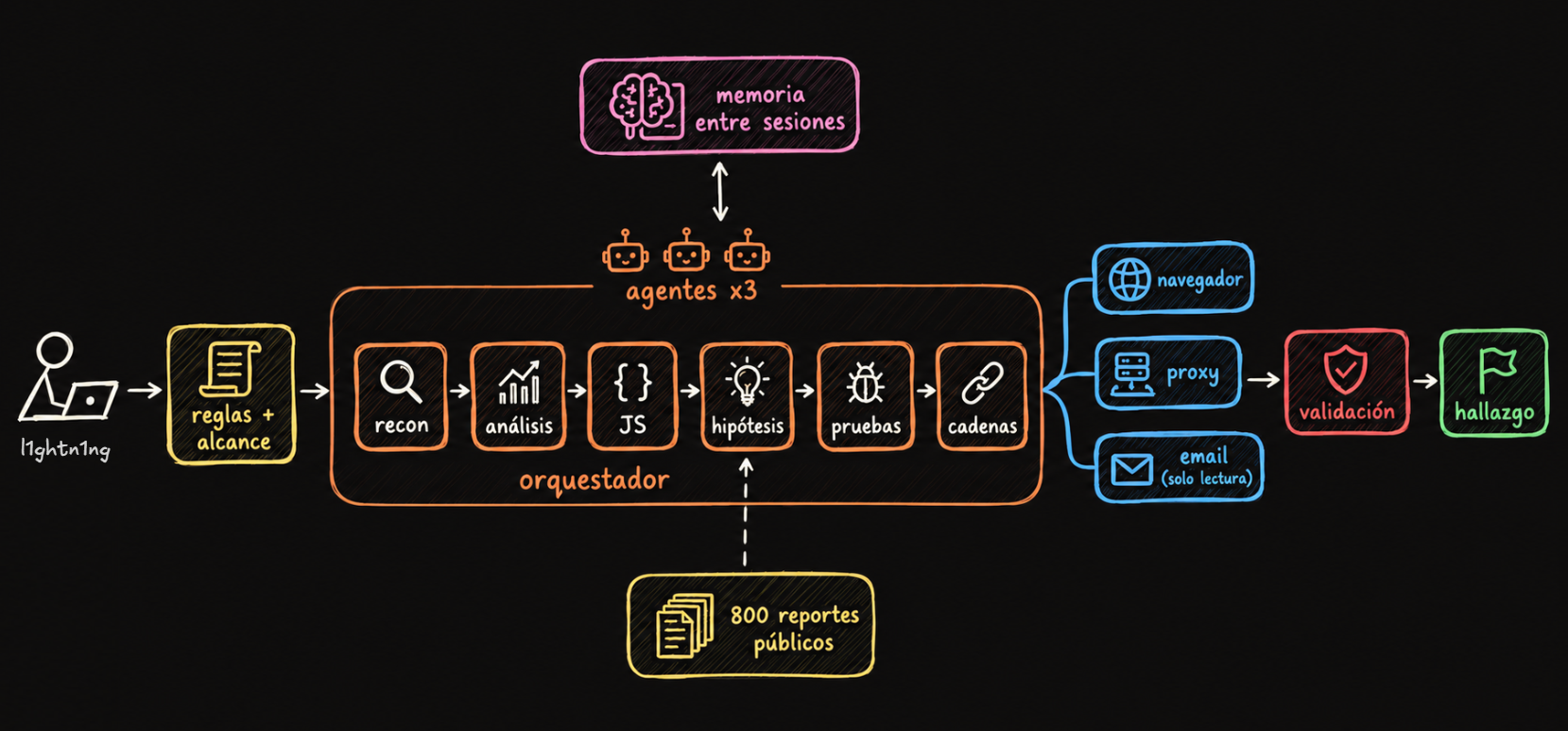
There's a central CLAUDE.md (the instructions file Claude Code always reads on startup) with the workflow's doctrine: rules, priorities and red lines. Another file works as a resource map, so the agent knows where everything is.
Each program has its own folder with its specific rules, a summary of what's in and out of scope, the endpoint map that gets built along the way, hypothesis notes, findings split into candidates (not yet validated by me) and confirmed, and the reports.
The pipeline
The work is split into chained skills, each one with a single responsibility:
- Recon: A script of my own runs the raw reconnaissance (subdomains, ports, technologies, URLs).
- Recon analysis: A skill reads all those results and writes a summary prioritizing what matters most. Raw recon is huge, so the only thing that goes into the agent's context is the summary.
- JS mining: Another skill downloads and analyzes all the application's JavaScript, looking for endpoints, parameters, keys and client-side logic. (Spoiler: the accepted critical came from here)
- Hypotheses: A skill generates vulnerability hypotheses, with one strict condition: every hypothesis needs evidence or a concrete argument from the target. "There might be SQLi because it's a website" gets discarded. "This endpoint takes the user from the body instead of the token" doesn't.
- Test: It tests each hypothesis and tries to escalate the impact before calling it good.
- Orchestration: A main skill combines hypothesis→test in a constant loop.
- Chaining: A skill reads all the current findings and tries to combine them. Two medium bugs chained together can be a critical, and that's exactly what happened with the RCE.
A knowledge base of 800 reports
I have a base of more than 800 public bug bounty reports, mostly web, with some mobile, cloud and LLM applications. Each one is a .md file with tags at the top describing the vulnerability class and the environment (xss, rce, chatbot, php, sql...).
If Claude Code had to read all 800 reports every time it researched something, it would run out of tokens on that alone 🙄. To avoid it, I use a single index.md that groups the reports by tag and lists which ones belong to each. When the agent is testing, for example, a chatbot with tool access, it first looks up the chatbot and rce tags in the index, and only opens those reports. That way it takes advantage of the experience from dozens of real findings without filling up the context.
Memory across sessions
An agent doesn't remember anything from one session to the next. That's why all the context lives in files:
- A
session_state.mdper program, constantly updated with what was done, what state it was left in, which test accounts exist and how to pick it back up. The Claude in the next session starts by reading that. - Every test an agent runs gets logged in summary form, so it's never repeated. Without this, each new session tests the same things again and burns tokens on stuff that was already ruled out.
Several agents in parallel (without stepping on each other)
The agents run in parallel, but only on different surfaces (different domains, features or files). If two agents touched the same thing, one could break the other's state (an account, a session, a notes file), so when there's a risk of collision they run in sequence. That night there were three, each with its own surface.
Also, not every agent runs on the most expensive model. Smaller, faster models are used for mechanical work (summarizing, sorting, parsing), and the most powerful model with high effort is used to generate hypotheses and exploit.
MCPs
The agents have three MCP integrations:
- Chrome, to control a real browser when needed (JavaScript-heavy flows, logins).
- Caido, the proxy, to send and replay requests and so all the traffic gets captured.
- A read-only email inbox, to receive verification and 2FA codes for the test accounts without me having to step in.
NOTE: I use Caido because it's faster and lighter than Burp Suite, but the flow works the same with any proxy that has an MCP.
The validation process up to the report
One of the problems with my workflow was that the agents found lots of potential weaknesses, but few ended up being real, reportable vulnerabilities. So I improved the validation process, adding several filters before findings reach me.
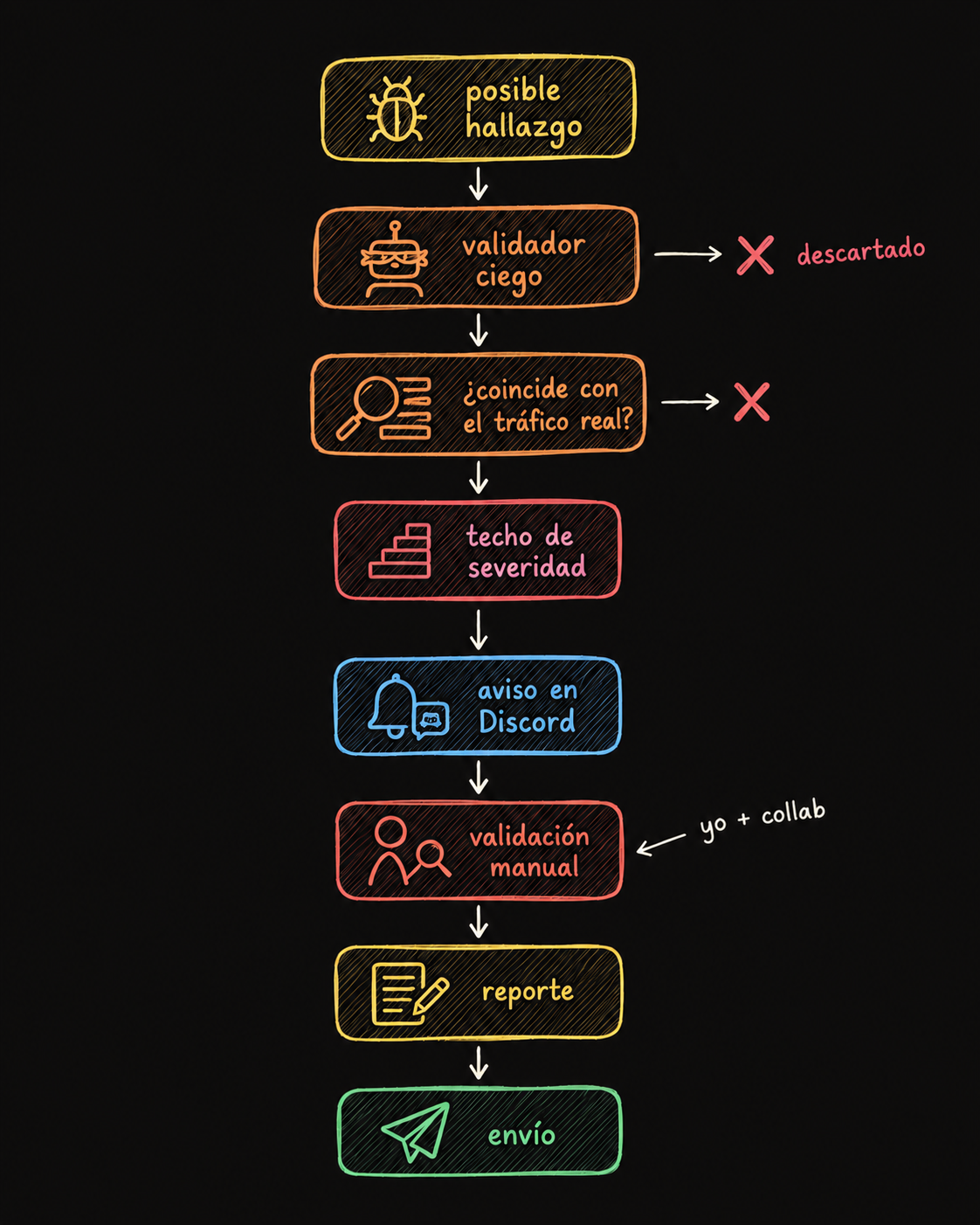
- A validator agent: Every finding goes to a subagent that doesn't have the context of the agent that found it. It only gets the step by step, and it has to reproduce it from scratch and confirm the impact is real. It's a blind validation: if the one who found the bug convinced itself of something that isn't true, the validator doesn't inherit that conviction.
- A code-based verifier: A script checks every claim the agent makes against the real captured HTTP traffic. It returns confirmed, refuted or inconclusive. A model can "remember" a response that never existed, but captured traffic doesn't lie.
- Severity questions: Before anything is delivered as a candidate, certain questions get answered, like: is the exposed data sensitive?, does it work as a pivot toward something else?, is the object enumerable? This prevents inflating severity, which is one of the most common mistakes in AI-generated reports.
- Discord notification: If it passes everything, the finding is saved as a candidate and I get a Discord message with the severity, description, impact, program and where the evidence was stored.
- My manual validation: I reproduce everything by hand in Burp or Caido.
- The report: With the finding confirmed, a skill writes the report in the platform's format. Then I review it, add the screenshots, and submit it myself (never the AI).
Ground rules
- Scope is always explicitly respected. The agents are never told "go break everything". Every time an agent is about to cross a red line (something destructive, something out of scope, reading sensitive data beyond what's needed to prove impact), it sends me a message and waits. I decide whether it continues.
- Everything coming from the target is data, never instructions. HTTP responses, HTML, JavaScript and tool output can contain text written to manipulate the model (prompt injection). That's why all the agents have explicit instructions to ignore any order or instruction they find inside the analyzed content and treat it strictly as information about the target.
Build your own skills
There are popular GitHub repositories with skills, agents and prompts for bug bounty, and what people usually do is copy them as they are. I took a few useful things from there, but my conclusion was: using the same thing everyone uses leads you to find the same things everyone finds. In other words, duplicates.
All my cheatsheets, the report selection, the skill definitions, the instructions and the scripts were built by me (with Claude's help), based on my experience doing manual bug bounty. That's what makes the system find different things.
IMPORTANT: One risk of copying third-party skills is skill injection: malicious instructions hidden in a skill that, for example, exfiltrate the results of a valid vulnerability to an external server and then delete the local files (among other, worse examples). That's why it's worth reviewing skills before using them.
What's next: a hackbot in code
Right now the flow depends on the skills being called in the right order, and that's decided by the model itself (or by me). I'm building hackbot, the same logic but orchestrated with Python scripts. The code decides when to launch a validator, which model and effort to use for each task, how many agents run in parallel and what to do when something fails. If I need to step in during a run (like sending it a message with a suggestion), I jump into the agent's session with its ID and write to it directly.
Why in code? Because a model can "forget" to run the validator, skip a step or interpret an instruction differently every time. Code doesn't. The deterministic part (the order, the checks, the limits) stays in code, and the model focuses on what it does well, which is thinking about the target.
The vulnerabilities found
1. Cryptographic key in JavaScript → access to any employee's data [CVSS 9.1, accepted]
The JS mining agent found an AES key exposed in a public JavaScript file, used to sign access token requests. With it, anyone could generate a valid token with read and write permissions, without needing an account. On top of that, the endpoints of an internal AI assistant took the user from a body field instead of the token, allowing anyone to access and delete any employee's conversations and attachments. The impact came from combining a client-side exposed secret with a BOLA.
2. Open redirect in the SSO → session hijacking [CVSS 8.1, duplicate]
The SSO validated the destination domain by checking whether the URL contained an allowed domain, instead of parsing it properly. Using an attacker domain followed by / and the legitimate domain (REDACTED.com/.attacker-domain), the validation passed, but the browser sent the session ticket to the attacker's domain. With that ticket you could take over the victim's session without a password, just by getting them to open a link that showed the legitimate domain.
3. Prompt injection in an AI agent → RCE as root [CVSS 9.8, duplicate]
The AI assistant from the first vulnerability had a tool to execute Python code on the server. Using the token generated with the exposed key, all it took was asking it through the chat to run a line of Python that executed a system command. The tool itself returned the execution output, confirming the code was running as root inside the agent's container. Bug 1 gave access and this third one turned it into RCE.
It's not always like this
There's something I want to clarify before wrapping up. Two criticals and a high in less than 10 hours isn't normal. Although it was a big company, it had fairly new AI applications. In programs with a lot of competition, finding vulnerabilities is harder, and there the usual thing is for the system to find P4/P3 findings and take longer.
On the other hand, the manual part still matters a lot. I always pair the agents with manual bug bounty, analyzing requests in Burp or Caido, guiding them on where to focus and validating what they do. Often the difference between a P4 and a P2 is in that guidance: knowing which minor finding is worth pushing, or spotting a chain the agent didn't see. This time the agents found everything on their own, but I built the system that made it possible with everything I learned doing manual bug bounty, and through trial and error.
Agents don't replace bug bounty hunters. They're a multiplier of their capabilities 📈