user@l1ghtn1ng:~$ cat blog/aprendiendo-hrs.md
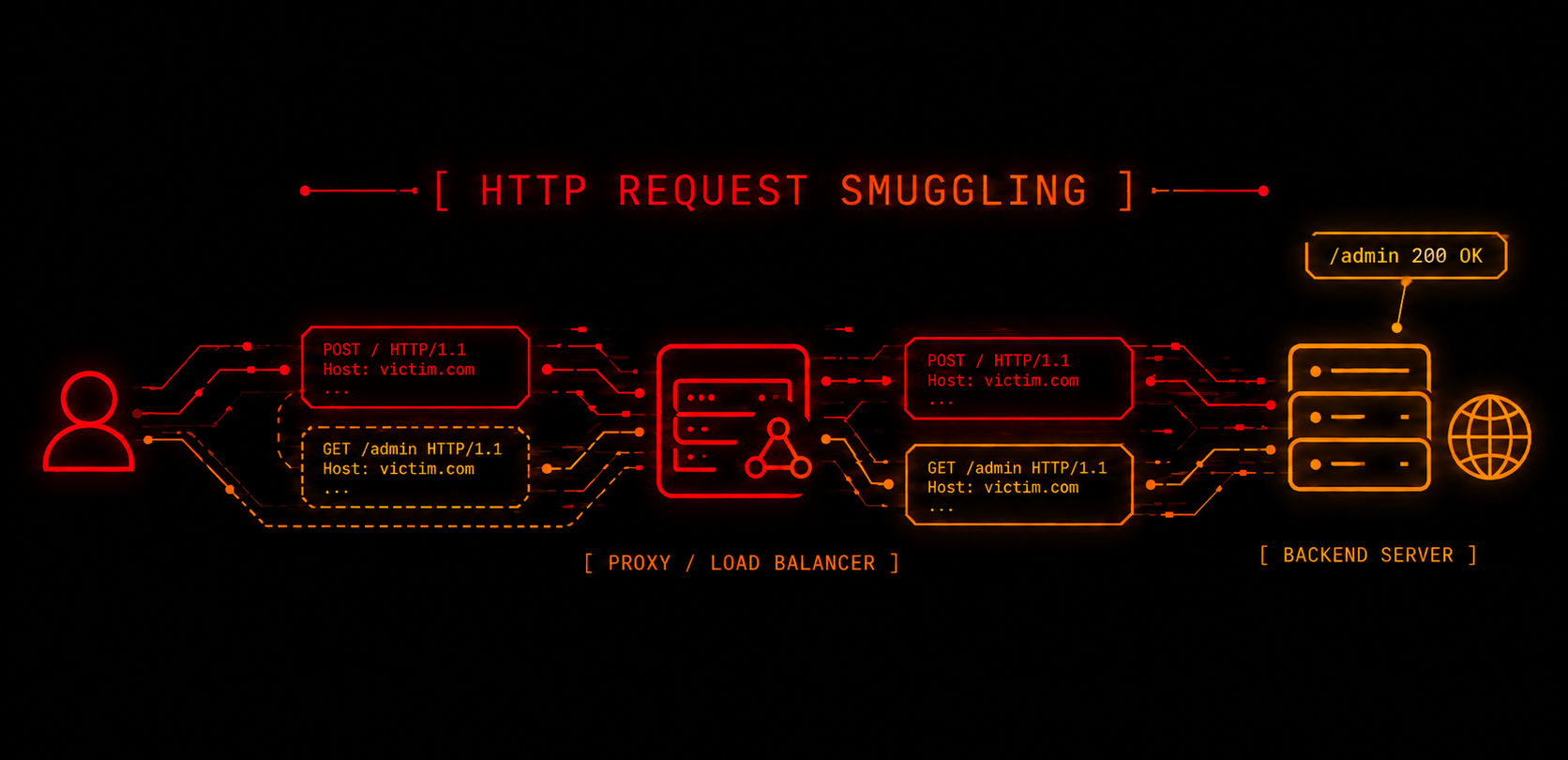
Learning HTTP Request Smuggling step by step
- #WebSecurity
- #hacking
- #BurpSuite
I explain how HTTP Request Smuggling works, how to detect it, and how to exploit it with practical examples.
I started studying HTTP Request Smuggling because of a fairly simple question: how is it possible for two servers to receive the same request and end up interpreting it completely differently?
When I started looking into it, I came across things like response queue poisoning, cache poisoning, HTTP/2 smuggling, and a thousand other variants (each name stranger than the last). And the worst part was that every explanation I found jumped straight into showing the attack, without first explaining what was actually happening between the frontend and the backend.
Then, through practice, I realized something: memorizing specific attacks or payloads isn't the important part. What really matters is understanding how each server interprets the same request.
That's why in this post I want to focus first on the basics:
- what HRS (HTTP Request Smuggling) is
- how it really works
- what signals to look for
- what questions to ask yourself
And later, to put it into practice, we're going to solve two PortSwigger labs step by step.
What is HTTP Request Smuggling?
It's a vulnerability that happens when two servers interpret the same HTTP request differently.
In most modern applications, requests don't go directly to the backend. Before that, they pass through one or more intermediaries.
That frontend can be a reverse proxy, a load balancer, or services like NGINX, HAProxy, or Cloudflare. Its job is to receive requests, filter them, balance them, and then forward them to the application's real backend.
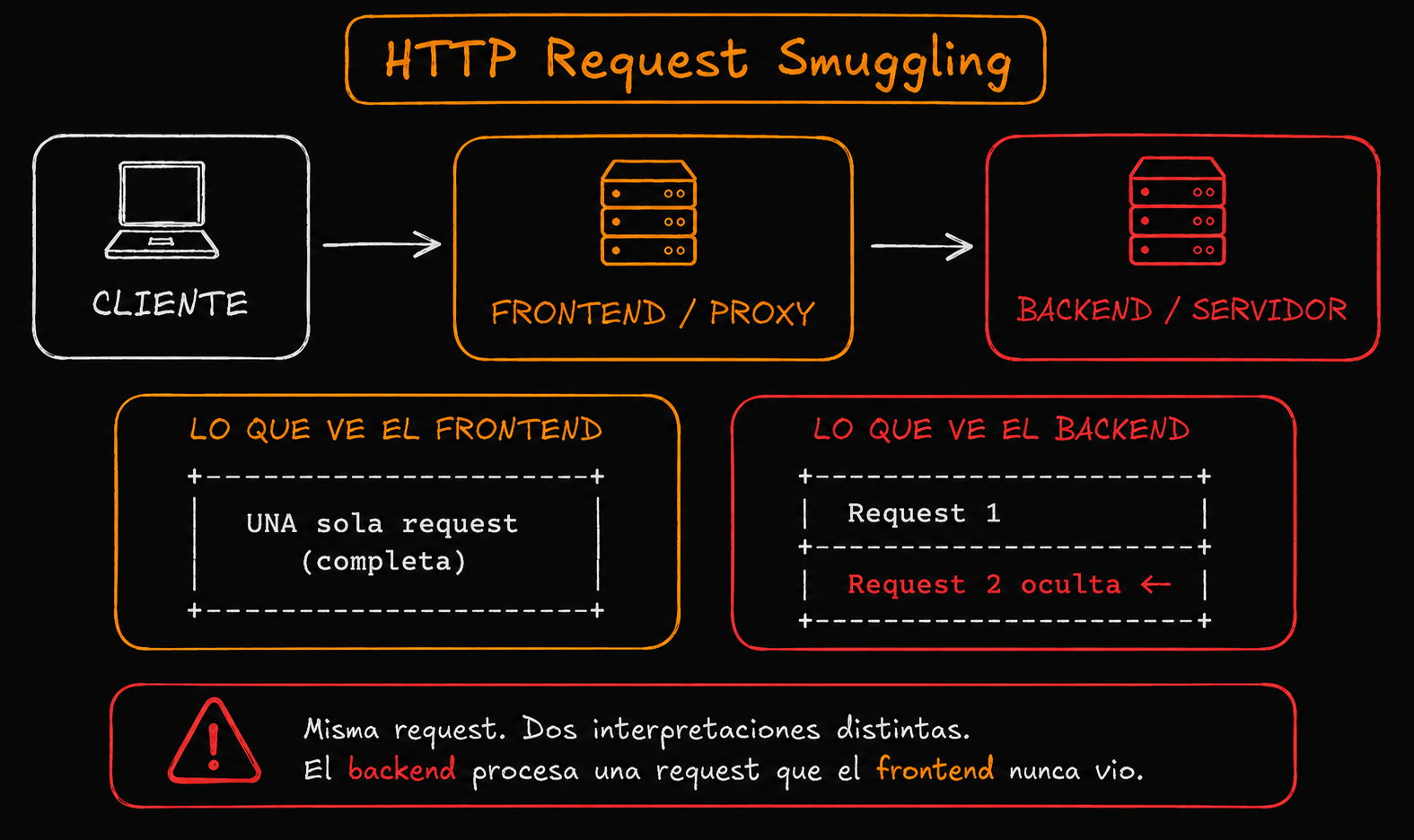
The problem appears when both servers don't interpret the request in exactly the same way.
The frontend may think the request ends at one point, while the backend believes there's still more information to process. That difference in interpretation creates a desynchronization between both servers.
And that's exactly where HTTP Request Smuggling is born: managing to hide ("smuggle") a second request inside the first one so the backend processes it in an unexpected way.
Why does this happen?
For an HTTP server to process a request correctly, it first needs to know where the body ends.
Normally, that is defined in two different ways:
Content-Length
It tells the server exactly how many bytes it should read from the body.
Content-Length: 20In this case, the server will read exactly 20 bytes and then consider the request finished.
Transfer-Encoding: chunked
Instead of sending the whole body at once, it's split into chunks.
Transfer-Encoding: chunkedThis is used when the total size of the body isn't known from the beginning. For example, in dynamically generated responses or streaming.
Each chunk indicates its size in hexadecimal before the data, until it reaches a final chunk with size 0, which marks the end of the body.
The problem appears when the same request contains both headers:
Content-Length: 20
Transfer-Encoding: chunked
According to the HTTP/1.1 specification, Transfer-Encoding should take priority. But in practice, not every server handles it the same way.
So something critical can happen:
- the frontend interprets the request using
Content-Length - while the backend interprets it using
Transfer-Encoding
Or the other way around.
That causes both servers to "lose synchronization" about where the request really ends. And that desynchronization is the foundation of HTTP Request Smuggling.
Main types of Request Smuggling
CL.TE
The frontend uses Content-Length to determine the end of the request, while the backend uses Transfer-Encoding.
TE.CL
The frontend uses Transfer-Encoding, but the backend processes the request using Content-Length.
TE.TE
Both servers use Transfer-Encoding, but one of them interprets the header differently.
We're not going to go deeper into this type in this post because it already enters more advanced scenarios.
Something important before starting
HRS usually doesn't appear in simple applications where the client and the backend communicate directly.
It normally requires an architecture with multiple intermediary components, such as proxies, reverse proxies, or load balancers, where different technologies process the same request before it reaches the final backend.
Also, it often depends on keep-alive connections and HTTP/1.1 support. That's why it's much more common to find this vulnerability in CDNs, modern architectures, microservices, and large applications with several intermediaries.
The more components there are processing HTTP requests, the more chances there are that one of them will interpret the request differently.
What signals make me think about HRS
This is probably one of the most important parts to learn.
In a real bug bounty environment, nobody is going to tell you: "this application is vulnerable to Request Smuggling", like in some labs.
That's why the important thing is learning how to detect signals that may indicate possible desynchronizations between the frontend and the backend.
Interesting headers
Some headers can indicate the existence of proxies or intermediary servers:
Via:
X-Forwarded-For:
X-Cache:
X-Served-By:
This doesn't automatically mean HRS exists, but it does mean there are probably several components processing the request before it reaches the backend. And that's exactly what this vulnerability usually needs.
Weird behaviors
Many times, the best signals come from analyzing the application's behavior. For example:
- requests that take much longer than normal or even wait until timeout
- unexpected
404responses after sending malformed payloads - small modifications in the request that make the server respond in a completely different way with status codes like
200,400,404, or502. - a normal request returns content that doesn't match what you just asked for
- invalid methods, for example:
Unrecognized method GPOST - responses that seem to belong to a previous request
Some of these behaviors can indicate that the frontend and the backend lost synchronization about where a request really ends.
HTTP/1.1 and keep-alive
Another very important detail is identifying whether the application uses HTTP/1.1 and persistent connections (keep-alive), since many classic HRS scenarios depend exactly on that.
In HTTP/1.1, connections are usually persistent by default. That means the client and the server don't create a new TCP connection for every request. Instead, they reuse the same connection to send multiple requests one after another.
The problem appears when the frontend and backend don't agree on where a request ends.
For example:
- the frontend believes the request has ended
- but the backend thinks it still needs to read part of the body
So the backend keeps waiting for more data inside that same TCP connection.
Since the connection remains open thanks to keep-alive, the next request that travels through that connection can end up being interpreted as a continuation of the previous request.
The methodology I usually follow
Before starting with any tool, I try to answer these questions in order. Even though I don't always follow the exact same path, this is the base I start from:
1. Is there a frontend + backend?
First, I try to identify whether intermediary components are processing the requests before they reach the real backend: proxies, reverse proxies, load balancers, CDNs.
If there isn't any intermediary component, there can't be desynchronization between two parts, so there's no HRS to exploit.
2. Does the application support HTTP/1.1?
As we mentioned before, HRS is usually much more common in applications that use HTTP/1.1.
If the application uses HTTP/2, the techniques we're going to see here don't apply directly.
3. What does each server interpret?
This is where the important part starts: understanding which header each component is prioritizing.
- Who uses
Content-Length? - Who uses
Transfer-Encoding?
It's not always obvious at first, and many times it takes a lot of trial and error.
4. What unexpected behavior can I trigger?
Once I have a hypothesis, I start testing concrete things:
- Can I trigger a timeout?
- If I smuggle a
GET /error, does an unexpected404appear afterwards? - Can I leave pending data to affect the next request sent through the same connection?
5. Can I turn that into real impact?
Detecting a desynchronization is only the beginning. After that, you need to think about how to turn that desynchronization into real impact for the application.
It can lead to things like:
- bypassing controls
- accessing internal routes like
/admin - XSS
- cache poisoning
- capturing other users' requests
And that conversion from "I found a bug" to "this has real impact" is the hardest part. But nothing a few hours fighting with Burp can't solve 😉.
Important Burp Suite configuration
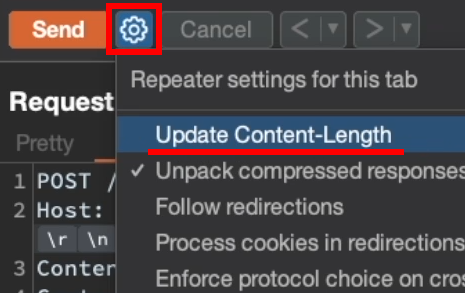
Disable "Update Content-Length"
Burp can automatically recalculate the value of Content-Length.
For HRS testing, this usually gets pretty annoying, because what we want is exactly to manually manipulate how the request is interpreted.
That's why it's a good idea to disable: Update Content-Length.
Use HTTP/1.1
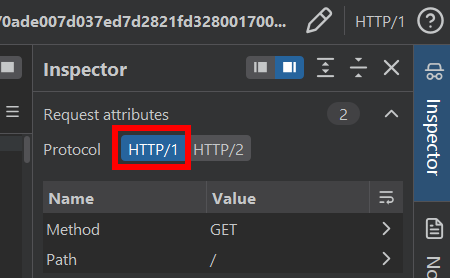
Sometimes requests are initially sent using HTTP/2, but the frontend/proxy converts them internally to HTTP/1.1 when forwarding them to the backend:
Client --HTTP/2--> Frontend/Proxy --HTTP/1.1--> BackendThat's why, in some scenarios, it may be necessary to change the request to HTTP/1.1 to exploit HRS correctly.
You can modify it from: Inspector > Request attributes.
Show special characters
It's also very useful to correctly visualize HTTP delimiters.
Enabling special character visualization lets you see things like: \r\n, which represent a carriage return and a line feed. These characters are used to separate lines inside a request.
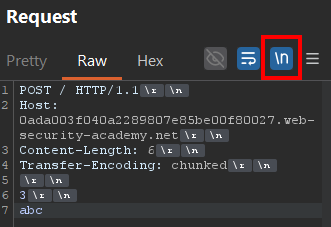
NOTE: a blank line (
\r\n\r\n) indicates the end of the headers and the beginning of the body.
Having said all that, now let's see how this looks in practice by solving two PortSwigger labs.
Lab 1 - Confirming a CL.TE vulnerability
For the first case, we're going to use this lab: HTTP request smuggling, confirming a CL.TE vulnerability via differential responses.
Step-by-step solution
After applying the Burp Suite configuration mentioned in the previous section, the first thing we need to do is send a simple request to / to analyze its behavior:
GET / HTTP/1.1
Host: LAB-ID.web-security-academy.net
It returns a 200 OK, which confirms that the application supports HTTP/1.1.
Once that's confirmed, we build a POST request to try to detect a possible CL.TE vulnerability:
POST / HTTP/1.1
Host: LAB-ID.web-security-academy.net
Content-Length: 6
Transfer-Encoding: chunked

3
abc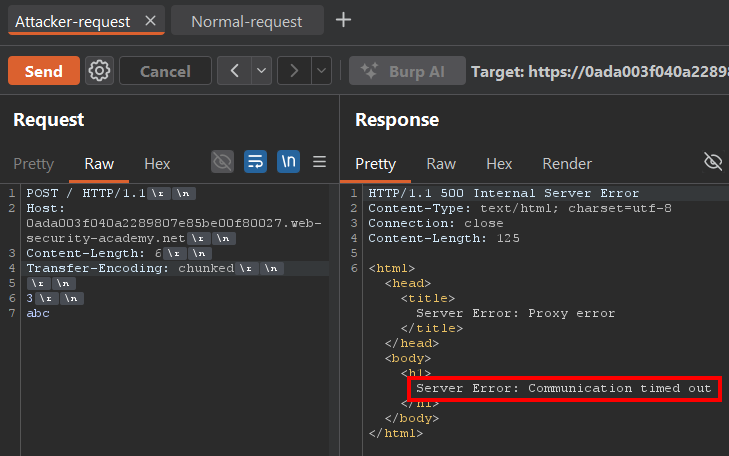
Even though it looks like an uninteresting error, it's actually exactly what we wanted to see.
If the frontend and the backend were interpreting the request in exactly the same way, we wouldn't get any timeout. But because each one is processing something different, the backend ends up waiting for data that the frontend considers already sent.
In detail: what's happening?
The frontend follows the Content-Length: 6 header, which makes it wait for 6 bytes of body before considering the request finished.
Those 6 bytes correspond to:
3\r\n   -> 3 bytes
abc     -> 3 bytes
           Total: 6 bytes
So the frontend thinks the request ended right after reading those 6 bytes.
But the backend follows the Transfer-Encoding: chunked header. So it reads the chunk with size 3, then reads the 3 bytes of data (abc), and then waits for a final chunk with size 0 to consider the request finished.
Since the frontend already decided the request ended at abc, it stops sending data, and that final chunk never arrives. So the backend never receives the final chunk (0) and keeps waiting for more data indefinitely, causing a timeout.
Confirming the vulnerability with differential responses
The idea is this:
- Send a "malicious" request that leaves the backend desynchronized
- Then send another request, for example to
/ - Check whether the second request receives an unexpected response
That's why they're called "differential responses", because a normal request starts returning something different from what we expected.
The request would look like this:
POST / HTTP/1.1
Host: LAB-ID.web-security-academy.net
Content-Length: 33
Transfer-Encoding: chunked

0

GET /error HTTP/1.1
Test: XNOTE: The
Test: Xheader is just an example. Both the header name and value can be anything; the important thing is that a valid header exists so the request is formed correctly.
Here the logic changes a bit.
Before, we wanted to trigger a timeout. Now, we want to leave a "hidden" request inside the backend connection. In other words, a smuggled request waiting to be processed.
The frontend uses Content-Length, so it interprets all the content as a single valid request. Since the size matches Content-Length: 33, it forwards absolutely everything to the backend without issues.
But the backend uses Transfer-Encoding: chunked. So when it finds the 0, it interprets that the body ended there. That makes this part:
GET /error HTTP/1.1
Test: X
remain pending inside the TCP connection until a new request arrives through that same connection.
The Test: X detail is VERY important.
As you can see, we don't add the final double line break (\r\n\r\n) that would normally mark the end of an HTTP request.
If we closed the request normally, the backend would end up seeing something like this when the user's next legitimate request arrives:
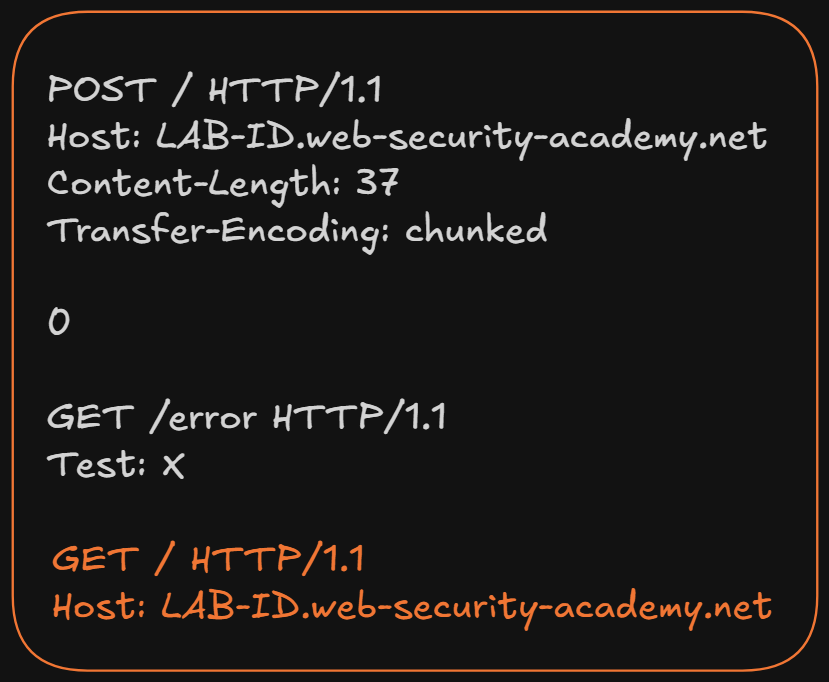
And that makes the request stop having a valid HTTP format, because two different request lines would appear inside the same block:
GET /error HTTP/1.1
GET / HTTP/1.1
Depending on the server, one of these things would probably happen:
- parsing error
- connection close
400response- request discard
Instead, by NOT adding the final line break, the next legitimate request gets concatenated directly to the previous header:
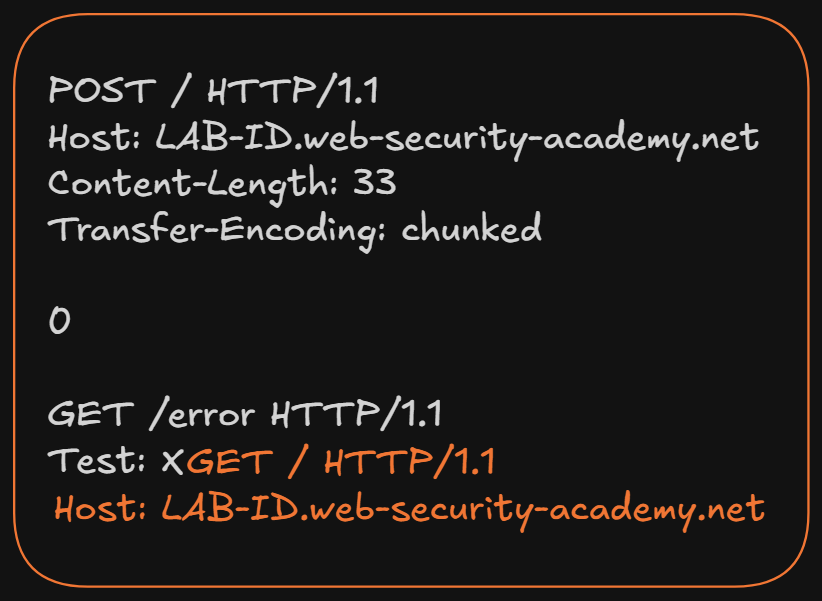
That's when the backend interprets XGET / HTTP/1.1 as part of the Test header value, which keeps the smuggled request in a valid HTTP format.
Since /error is a route that doesn't exist, the backend responds with a 404, confirming that the smuggled request was processed correctly.
To test this, after sending the malicious request, we simply send again the request to / that we sent at the beginning:
GET / HTTP/1.1
Host: LAB-ID.web-security-academy.net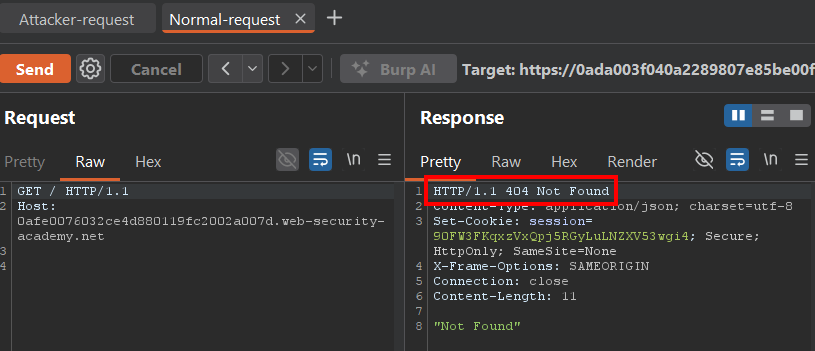
And that's where the desynchronization confirmation appears.
Instead of receiving a 200 OK, we receive a 404 Not Found. That's because the backend didn't process our legitimate request to / first. It first executed the smuggled request (GET /error) that we had left pending.
The important part of this lab
The idea isn't to memorize these specific payloads.
The important thing is understanding the reasoning:
- First, we look for desynchronization signals
- Then, we try to leave a request pending
- Finally, we observe whether it affects the next legitimate request
That's exactly what later ends up being exploited in real cases.
Lab 2 - Bypassing frontend controls with CL.TE
The second lab is: Exploiting HTTP request smuggling to bypass front-end security controls, CL.TE vulnerability
In this case, the application has a panel at /admin.
But if we try to access it normally, the frontend blocks the request before it reaches the backend.
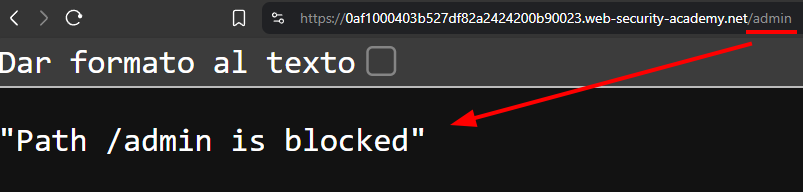
That confirms two important things:
- the frontend is applying a validation: "only local users can access
/admin" - access is blocked before we can interact with the real panel
But if we manage to desynchronize frontend and backend, we can make the frontend not see an independent request to /admin, while the backend does process it.
That means if we manage to hide the real request from the frontend, we can probably bypass the access control.
Visually, it would look something like this:
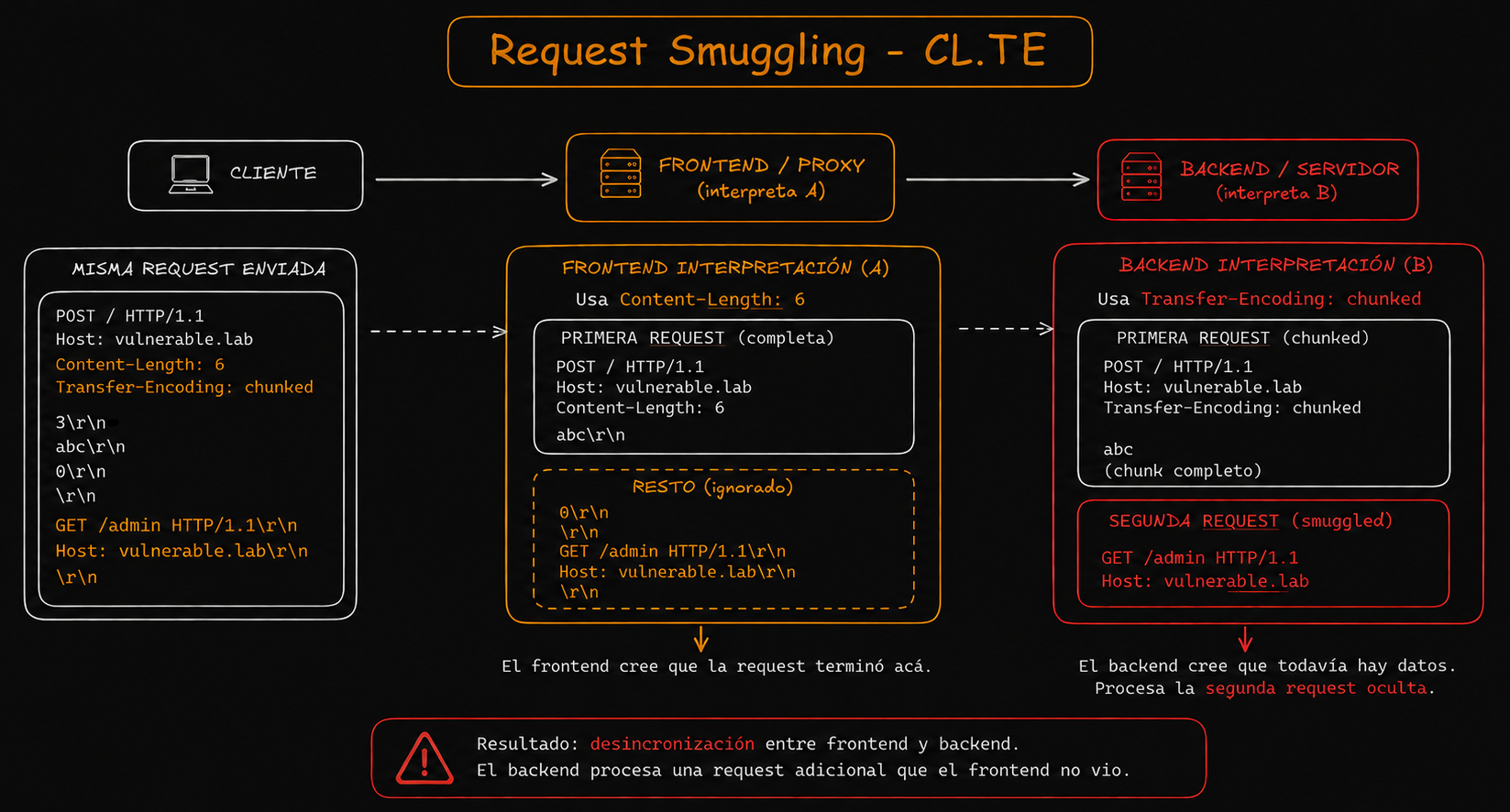
Step-by-step solution
The attack idea
We want to take advantage of exactly the same desynchronization from the previous lab. The difference is that now we're not going to leave just any request pending.
Now we want the backend to process this:
GET /admin HTTP/1.1
Host: localhost
There's an important detail here: Host: localhost. Usually, this kind of internal panel only allows access from:
- localhost
- internal networks
- or requests originated from the server itself
So the idea is to get the backend to interpret the request as coming from localhost.
Building the request
The logic is practically the same as in the previous lab, so the request looks like this:
POST / HTTP/1.1
Host: LAB-ID.web-security-academy.net
Content-Length: 74
Transfer-Encoding: chunked

0
GET /admin HTTP/1.1 Host: localhost Content-Length: 13
test=test
The frontend uses `Content-Length: 74`, so for it, all the content is a single valid request. It simply counts the bytes, doesn't interpret the chunked format, and forwards everything to the backend believing it's one single request.

The block on `/admin` is never applied because, from its perspective, there isn't any independent request to that route.

On the other hand, the backend uses `Transfer-Encoding: chunked`. So when it finds the `0`, it interprets that the request ended. Everything that comes after that is interpreted as a new request inside the same connection:

GET /admin HTTP/1.1
Host: localhost
From its perspective, that's a completely separate second request, originated from localhost.
Confirming the bypass
After sending the payload, we send a request to /:
GET / HTTP/1.1
Host: LAB-ID.web-security-academy.net
Result:
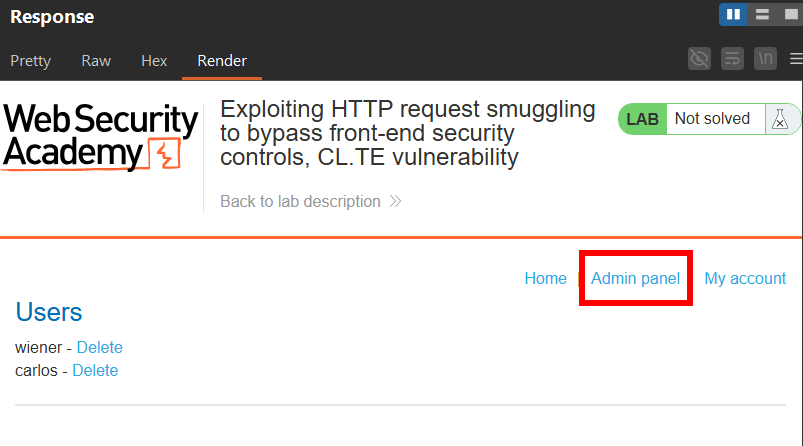
As we can see:
- the backend processes the smuggled request first
- it interprets
Host: localhost - and responds with the
/adminpanel

Without creating an account, without bypassing a login, without exploiting anything in the frontend. Simply taking advantage of two servers not agreeing with each other.
From there, the rest of the lab simply consists of reusing the same concept against the endpoint responsible for deleting the user carlos.
Although honestly, the important part isn't solving the lab itself, but understanding how we managed to make the backend process a request that the frontend never interpreted correctly.
Conclusion
Once we understand the process behind both labs, we already have the most important foundation of HTTP Request Smuggling:
- detecting a desynchronization
- understanding how each server interprets the request
- and getting the backend to process something the frontend never got to validate correctly
What changed my mindset the most when I understood this wasn't learning the payloads, but understanding the right question. It isn't "what payload do I use", but "how do I make the frontend and the backend disagree with each other". That single question opens a ton of possibilities.
To keep learning, I highly recommend the theory and labs from PortSwigger Academy:
In a future post, I want to go a bit further with more advanced scenarios closer to real bug bounty: HTTP/2, cache poisoning, TE obfuscation, and response queue poisoning.
Meanwhile, open Burp, do the labs, and break things in a controlled environment. That's where you really start understanding HRS 😎.